Project Instructions and Knowledge
Written By GoMarble
Last updated 11 days ago
Project Instructions
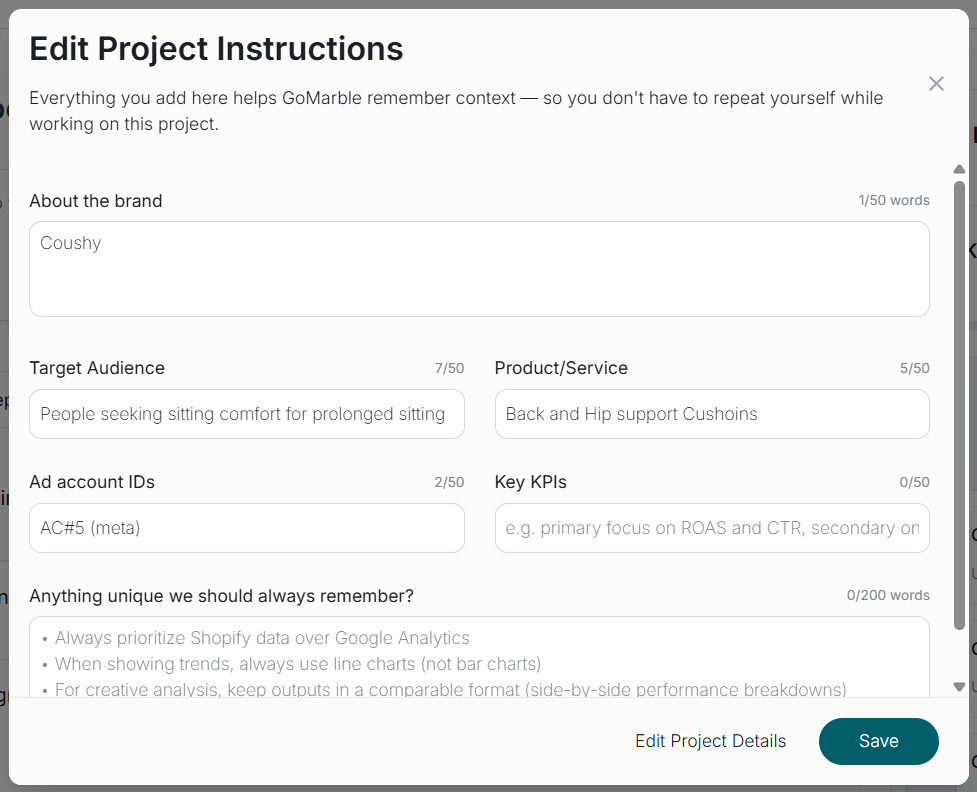
Project Instructions are custom rules, preferences, and guidelines that GoMarble automatically follows in every chat and report within that Project. You write them once in plain language, and GoMarble remembers them permanently.
Instructions can cover anything from which metrics to prioritize, how to format reports, when to recommend scaling or pausing ads, which accounts to use, and how to handle specific scenarios.
Accessing Project Instructions
Within any Project, look for "Project Instructions" or a settings icon. This opens an editor where you can write and modify your instructions.
Project Knowledge
While Project Instructions tell GoMarble what to do, Project Knowledge gives it the information it needs to understand your business deeply. This is where GoMarble becomes truly powerful.
What is Project Knowledge?
Project Knowledge is a library of reference documents that GoMarble can access automatically whenever it needs context to answer your questions or build reports.
Supports TXT, MD, PDF, CSV, XLS, XLSX, DOC, DOCX, PPT, PPTX, and images (10MB max per file)
GoMarble searches through them intelligently without you having to specify which file to check each time.
Think of it as giving GoMarble access to your team's shared drive, but with the intelligence to find and use the right information at the right time.
Project context and file search scope are also retained for any agents created or edited within a Project. This means scheduled chats and automated agents will automatically use the same Project Instructions and Knowledge as your regular chats, without any additional configuration.
