Attachments in GoMarble AI
Attachments let you share files directly with GoMarble for analysis, review, and processing.
Written By GoMarble
Last updated 11 months ago
Chat Attachments
Upload files directly to any conversation.
File Size Limit: 500KB per file
Supported Formats: TXT, MD, CSV, XLS, XLSX, DOC, DOCX, PPT, PPTX, and images
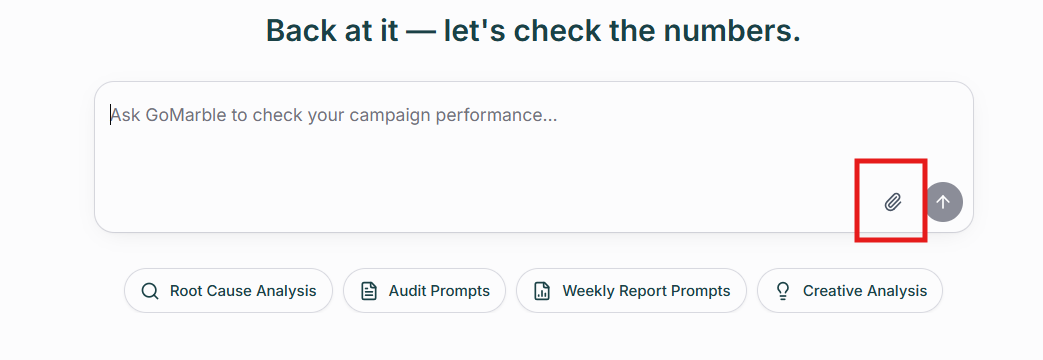
Chat attachments are temporary—they exist only in that specific conversation.
Project Attachments
Add files to your Project Knowledge library. GoMarble can reference these automatically across every chat and report in that project.
File Size Limit: 20MB per file (10MB max for images)
Supported Formats: TXT, MD, PDF, CSV, XLS, XLSX, DOC, DOCX, PPT, PPTX, and images
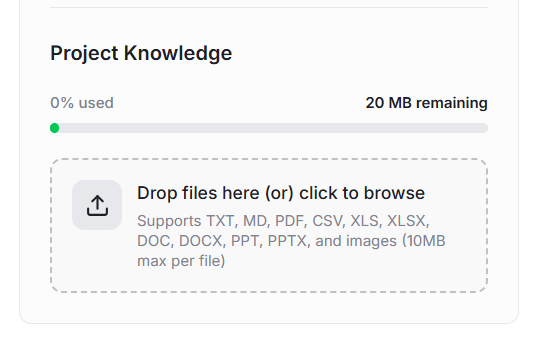
Project attachments are reference materials that GoMarble searches intelligently whenever it needs context within that project.
Was this helpful?
Still need help? Share an idea