GoMarble Partner Program
Written By GoMarble
Last updated 9 months ago
The GoMarble Partner Program lets you earn rev-share by introducing GoMarble AI to your audience. We run our affiliate program through Partnero, ensuring simple, transparent tracking of signups and rev‑share.
How the Partner Program Works
When you join the GoMarble Partner Program, you'll receive a unique referral link through Partnero. When someone clicks your link and purchases a GoMarble paid plan, you'll earn rev-share.
Rev-Share Structure
Our rev-share structure is straightforward and designed to reward active referrals:
First Month: 50% rev-share on the first month's payment
Months 2-12: 20% recurring rev-share for the rest of the first year
Duration: Rev-share is paid for up to 12 months per referred account
Rev-Share Payouts
Payouts are available once you reach $100 in rev-share. We process payments via PayPal only, so make sure your account is connected.
Tracking Details:
Your referral links track purchases for 60 days after the initial click
If someone clicks multiple links, the first one clicked gets credit
Refunded accounts don't qualify for rev-share
Getting Started
Sign Up for the Partner Program
To join the GoMarble Partner Program:
Visit our Partner Program signup page to apply
Complete the application form within Partnero
Once submitted, you'll receive access to your dashboard
Access Your Dashboard
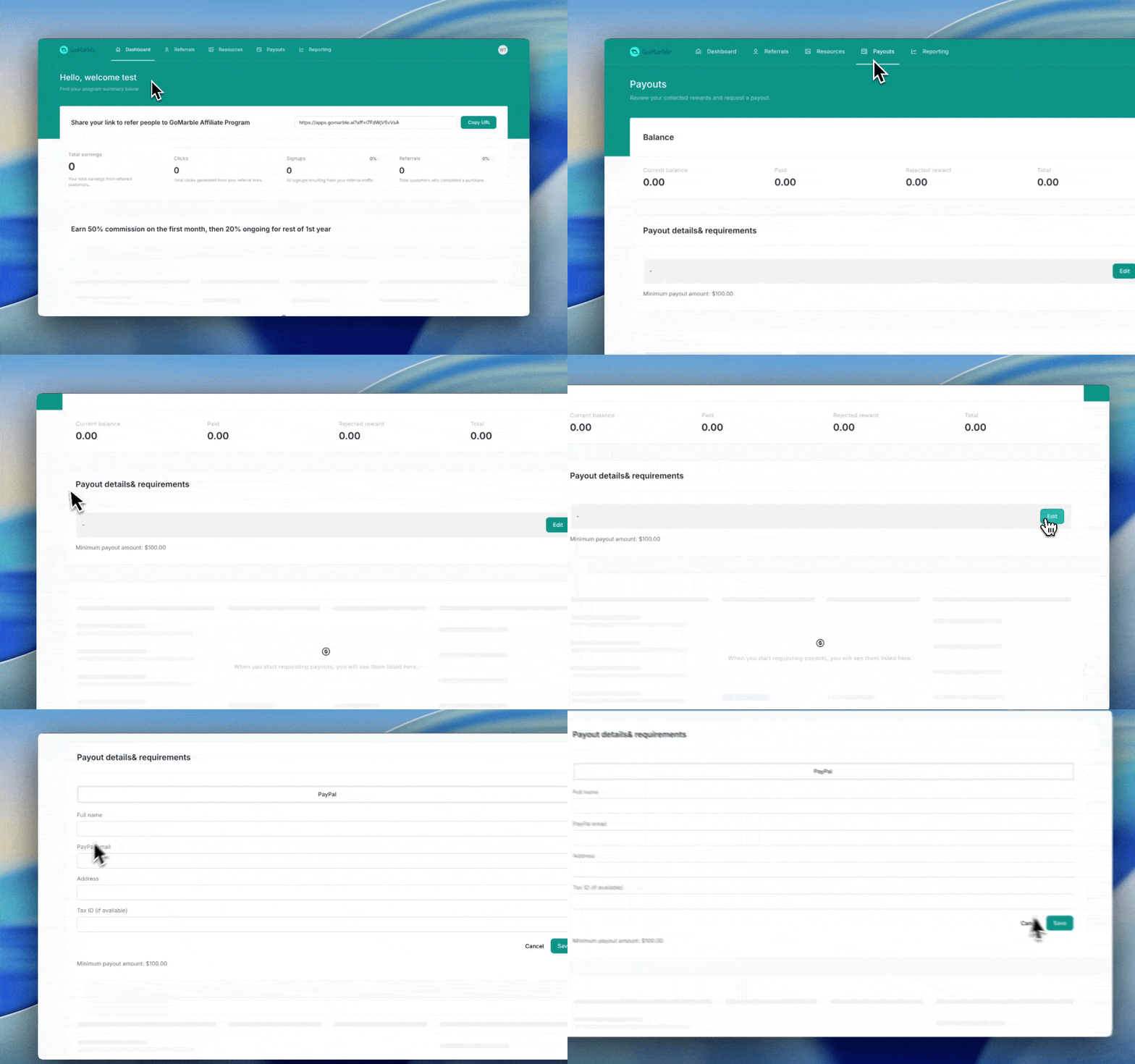
Log in to your Partner Program dashboard at gomarble-affiliate.partneroapp.com. This is where you'll manage all your partner activities.
Your dashboard shows:
Click-through rates
Signups from your links
Paid conversions
Rev-share earnings
Find Your Referral Link
Your unique referral link is displayed in your Partnero dashboard and can be easily copied. Use this link for all promotional efforts to ensure accurate tracking.
Connecting Your PayPal Account
To set up your PayPal account for payouts:
Navigate to the Payouts section in your dashboard
Scroll down to "Payout details & requirements" and click Edit
Fill in the following information:
Full name
PayPal linked email address
Mailing address
Tax ID (optional, if available)
Save your changes
Once completed, you're all set to receive your revenue share payments!
How to Promote GoMarble
Here are effective ways to promote GoMarble AI and maximize your earnings:
Personal Recommendations Share your experience with GoMarble AI with marketers and agencies who need intuitive paid media reporting and creative analysis with actionable insights.
Reviews and Comparisons Write authentic reviews of GoMarble AI to attract search traffic. If you've used other platforms, create comparisons highlighting GoMarble's strengths.
Tutorials and Walkthroughs Help new users succeed by creating guides or video tutorials showing how to get started with GoMarble's reporting and creative analysis features.
Social Media Share directly to Facebook, Twitter, and LinkedIn with one click from your Partner Program dashboard.
Was this helpful?
Still need help? Share an idea